If you hold assets across a dozen wallets, five chains, and a rotating cast of DeFi protocols, spreadsheets stop working around week two. Portfolio trackers exist to fix that, and two names show up in almost every serious DeFi user’s browser: Zapper and DeBank. Both let you plug in any wallet address and see the whole picture in seconds. But the two products have grown in very different directions, and picking the wrong one can cost you real hours (and sometimes real money in missed rewards). Here is how they stack up in 2026.
Quick Verdict / TL;DR
- Pick DeBank if you are an EVM power user who wants the deepest possible tracking across Ethereum, L2s, and every corner of DeFi, plus a native Web3 social feed and a solid mobile app.
- Pick Zapper if you want the cleanest UI, first-class NFT and multi-chain (including Solana) coverage, in-app bridging and swaps, and a friendlier onboarding for newer users.
- Overall winner for pure DeFi tracking: DeBank. Best all-round dashboard for most crypto users: Zapper.
What Are Zapper and DeBank?
Both products are read-only portfolio trackers. You paste in a wallet address (or connect your wallet) and the platform reads on-chain state to show your tokens, DeFi positions, NFTs, rewards, and history. Neither one takes custody of your funds, which is a big part of why the crypto-native crowd trusts them. They also both layer a light social product on top: follow other wallets, watch what they are farming, and copy strategies.

Zapper at a glance
Zapper launched in 2020 as a “DeFi hub” and has steadily broadened into a full multi-chain dashboard. Today it supports 40 plus networks, including all major EVM L1s and L2s, Solana, and a growing list of app-chains. It bundles tracking with in-app actions like swaps, bridges, and one-click exits from LP positions.
DeBank at a glance
DeBank started as an Ethereum-focused DeFi dashboard and became the de facto standard for tracking positions across EVM protocols. It supports 30 plus EVM networks, does not natively cover non-EVM chains like Solana or Bitcoin, and layers on Web3 messaging, a social feed, and DeBank Chain (its own L2 for identity and payments).
Supported Chains and Coverage
This is the single biggest difference between the two, so it deserves its own section.
- Zapper: 40 plus networks. Ethereum, Arbitrum, Base, Optimism, Polygon, zkSync, Scroll, Linea, BNB Chain, Avalanche, Fantom, Celo, Gnosis, plus Solana and several Cosmos-adjacent chains. Solana coverage was rebuilt in 2025 and now handles Jupiter-routed swaps, LSTs, and popular Solana DEX LP positions.
- DeBank: 30 plus EVM networks. Extremely deep coverage of every EVM chain that matters, including obscure L2s that Zapper sometimes indexes days later. No Solana, no Bitcoin, no Cosmos.
If your portfolio lives across Solana and Ethereum, Zapper is the only realistic single-pane-of-glass option. If you are all-EVM, DeBank is unmatched on depth.
Features Deep Dive
Position tracking
DeBank still holds the crown for pure DeFi position accuracy. It picks up staked positions, veTokens, locked LPs, farming rewards, and bribes on protocols like Curve and Convex faster than any competitor. Zapper is close (and better than it used to be) but still occasionally lags DeBank by hours on newer protocol integrations.
NFTs
Zapper wins comfortably. NFT valuations, floor prices, per-collection PnL, and rarity data are all first-class. DeBank has an NFT tab but treats them as a secondary asset class.
In-app actions (swap, bridge, exit)
Zapper has aggressively built an actions layer on top of its dashboard. You can swap tokens (via a routing aggregator), bridge between chains, and exit LPs in one click, all without leaving the app. DeBank offers a swap and a bridge (via Rabby, its sister wallet), but the flow is more manual.
Social and Web3 identity
DeBank leans in harder here. It has a native Web3 messaging feature, an activity feed, a “streams” product, and DeBank Chain for on-chain identity. Zapper’s social features are lighter (follow wallets, see trending activity) but well integrated.
Mobile
Both ship native iOS and Android apps in 2026, and both are good. DeBank’s mobile app is a bit more feature-complete on the DeFi side; Zapper’s is friendlier for browsing NFTs.
API and developer access
DeBank Cloud (its paid API) is the industry standard for on-chain analytics teams and wallet builders. It powers many wallet portfolio views you already use. Zapper has an API too (and a strong GraphQL endpoint), but DeBank Cloud has broader adoption among institutional customers.
Fees and Pricing
- Zapper: Free to use the dashboard. In-app swaps and bridges charge a service fee on top of the underlying router, typically around 0.85 percent, plus normal DEX and bridge fees. API access is metered and priced per plan.
- DeBank: Free for the dashboard, mobile app, and social features. Swaps and bridges route through partners with variable fees. The Cloud API is the main paid product, with pricing based on request volume.
For read-only tracking, both are effectively free. Costs only appear if you actually transact through them or hit the API.
Comparison Table
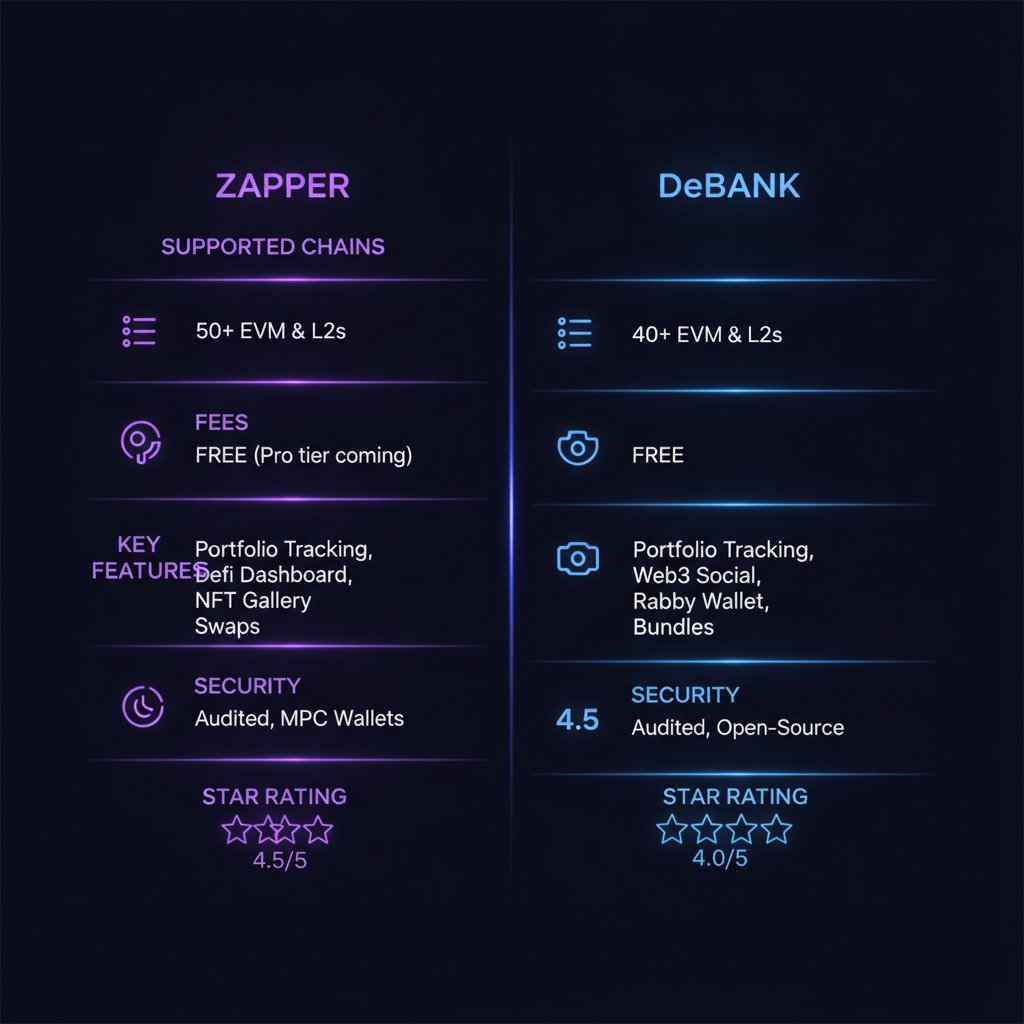
| Feature | Zapper | DeBank |
|---|---|---|
| Launched | 2020 | 2019 |
| Supported chains | 40+ (EVM plus Solana) | 30+ EVM only |
| NFT support | First-class | Basic |
| DeFi position depth | Very good | Best in class |
| In-app swap and bridge | Yes, integrated | Yes, via partners and Rabby |
| Mobile apps | iOS and Android | iOS and Android |
| Web3 social | Light (follows and feeds) | Deep (messaging, feed, DeBank Chain) |
| Dashboard fee | Free | Free |
| API | GraphQL, tiered plans | DeBank Cloud, tiered plans |
| Custody | Non-custodial, read-only | Non-custodial, read-only |
| Star rating | 4.5 / 5 | 4.6 / 5 |
Pros and Cons
Zapper
Pros:
- Cleanest, most beginner-friendly UI of any tracker
- Solana plus EVM in one dashboard
- Strong NFT support
- One-click LP exits and integrated swaps
- Excellent GraphQL API for builders
Cons:
- Position tracking can trail DeBank by hours on new protocols
- Swap fee (around 0.85 percent) is not free money for active traders
- Social feed still lighter than DeBank’s
DeBank
Pros:
- Best-in-class DeFi position accuracy across EVM chains
- Deep Web3 social layer (messaging, feed, DeBank Chain identity)
- Strong sister wallet (Rabby) with tight integration
- Industry-standard Cloud API for developers
- Fast to index new EVM protocols
Cons:
- No Solana, no non-EVM chains
- NFT support is basic
- UI is denser and less friendly for new users
- Some paid API tiers get expensive at scale
Security and Trust
Both products are read-only by default. Neither takes custody of funds when you simply track a wallet, and neither asks for private keys or seed phrases. Actions like swaps or bridges require you to connect a wallet and sign transactions, at which point standard wallet security applies.

DeBank has been operating since 2019 with no major security incident. Its sister wallet Rabby is open source and has published audits from firms like SlowMist. Zapper has a longer history of external audits on its contracts and its in-app actions layer, and its team publishes regular security post-mortems when integrations misbehave. Neither has ever lost user funds through the tracker itself.
A word of caution that applies to both: because these dashboards aggregate a lot of protocol integrations, they can occasionally display incorrect balances during upstream outages. Always sanity-check large numbers against the underlying protocol UI before making decisions.
User Experience
Zapper’s UI is one of the best in crypto, period. Clear cards, obvious grouping, and sensible defaults. A new DeFi user can figure it out in five minutes. DeBank is denser: more numbers per square inch, more tabs, and more assumed knowledge. Power users prefer it precisely because nothing is hidden. If you have three wallets and mostly hold ETH, stablecoins, and an LST, Zapper feels great. If you have twelve wallets across every L2 and are chasing points programs on obscure protocols, DeBank feels essential.
Mobile UX is close. Both handle push notifications for large balance changes, both let you group wallets into “bundles” or “watchlists,” and both are fast on modern phones.
Verdict and Rating
Zapper: 4.5 / 5. The best all-round dashboard for most crypto users. If your portfolio touches Solana or you care about NFTs, Zapper is the default answer. It is also the tracker most likely to survive a friend asking “which app should I install to see my crypto in one place?”
DeBank: 4.6 / 5. The tracker for serious EVM DeFi users. If you spend real money on gas every week, farm points, or manage positions across ten protocols, DeBank still gives you the tightest, most accurate view. The Web3 social layer is a nice bonus once you find your circle.
In practice, plenty of people we know run both: DeBank open in one tab for EVM DeFi accuracy, Zapper open in another for NFTs, Solana, and quick swaps.
Related reading on PumpParade
- MetaMask vs Trust Wallet: Best Crypto Wallet 2026
- Aave Review 2026: Fees, Features and Is It Worth It?
FAQ
Is Zapper or DeBank safer?
Both are non-custodial and read-only for pure tracking, so the “safety” question really applies to their action features (swaps, bridges, wallet integrations). Both have long, clean track records. Neither has ever custodied user funds.
Do Zapper and DeBank charge to see my portfolio?
No. The dashboards, mobile apps, and social features are free. You only pay when you use in-app swaps or bridges, or when you subscribe to their APIs as a developer.
Can DeBank track Solana wallets?
Not natively. DeBank is EVM-only in 2026. If you need Solana coverage in the same app as your EVM wallets, use Zapper (or a dedicated Solana tracker like Step Finance).
Which tracker is better for NFTs?
Zapper. It has first-class NFT support with floor prices, PnL, and rarity data. DeBank shows NFTs but treats them as a secondary asset.
Do I need to connect my wallet to use them?
No. You can paste any public wallet address to view its portfolio. Connecting a wallet is only required for actions like swapping or bridging.
This article is for informational purposes and is not financial advice. Always verify balances and positions in the underlying protocol UI before making decisions.