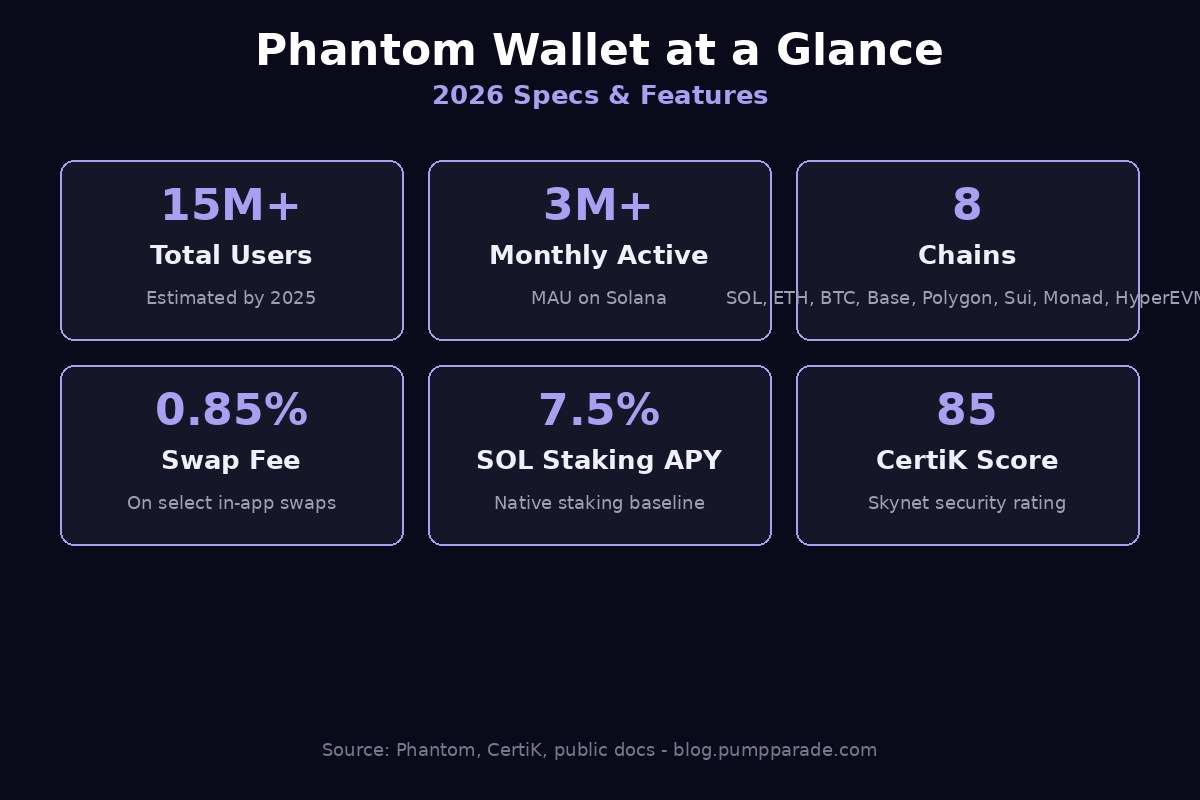
If you have ever held a Solana token, swapped a memecoin, or minted an NFT in the last few years, the odds are very high that you did it through Phantom. What started in 2021 as a clean Solana-only browser extension has, by 2026, turned into one of the most widely used self-custody wallets in crypto, with multi-chain support across Solana, Ethereum, Bitcoin, Base, Polygon, Sui, Monad, and HyperEVM. It now serves an estimated 15 million users and more than 3 million monthly actives.
But popularity is not the same as the right wallet for you. Fees, security guarantees, network coverage, and UX trade-offs all matter. This deep-dive review walks through everything Phantom does in 2026, where it still falls short, and who should actually be using it.
Quick Verdict (TL;DR)
- Overall rating: 4.6 / 5. The best general-purpose hot wallet for active onchain users in 2026.
- Best for: Solana power users, NFT collectors, multi-chain traders who want one app for SOL, ETH, BTC, Base, and Sui.
- Not for: Heavy Arbitrum / Optimism / BNB Chain users, long-term cold storage, or advanced Bitcoin users who need full UTXO control.
- Swap fee: 0.85% on select in-app swaps, plus network and bridge fees.
- Security: Self-custody, transaction simulation, real-time scam detection, Ledger integration. 85 score on CertiK Skynet.
- Bottom line: If you live onchain and Solana is part of your stack, Phantom is still the wallet to beat.
What Is Phantom Wallet?
Phantom is a non-custodial crypto wallet available as a browser extension for Chrome, Brave, Firefox, and Edge, and as a mobile app on iOS and Android. It started life in 2021 as a Solana-only wallet built by ex-Solana Labs engineers and quickly became the default way to interact with the Solana ecosystem.
Since 2023 it has aggressively expanded into multi-chain territory. As of 2026, Phantom supports eight chains natively: Solana, Ethereum, Base, Polygon, Sui, Bitcoin (Native and Taproot), Monad, and HyperEVM. It bundles a swap aggregator, a staking interface, an NFT gallery, a dApp browser, transaction simulation, and a fiat on-ramp into one product.
The company raised a $109 million Series C in 2025 led by Sequoia and Paradigm, valuing the wallet at over $3 billion. That war chest is funding its push to become the default consumer wallet of crypto, not just of Solana.
Key Stats at a Glance
Features Deep Dive
1. Multi-Chain Support
Phantom now natively supports eight chains: Solana, Ethereum, Base, Polygon, Sui, Bitcoin, Monad, and HyperEVM. You can hold and send assets on all of them from a single seed phrase, and the wallet auto-detects which chain a dApp wants to connect to.
The trade-off is that Phantom does not let you manually add custom networks. So if you live on Arbitrum, Optimism, BNB Chain, Avalanche, Linea, or zkSync, you will still need a second wallet such as MetaMask or Rabby. For most Solana-first users, that limitation is fine. For EVM-first users, it can be a dealbreaker.
2. In-App Swaps and Bridging
Phantom’s built-in swap routes through Jupiter on Solana and through 1inch and other aggregators on EVM chains, which means you get aggregator-quality pricing without leaving the wallet. Cross-chain swaps are supported between Solana, Ethereum, Base, Polygon, and Sui through integrated bridges. For a deeper look at how the underlying routers compare, see our Jupiter vs 1inch breakdown.
The headline cost is a 0.85% Phantom service fee on select swaps, plus the underlying network gas and bridge fees (roughly 0.3% on cross-chain routes). That is higher than swapping directly on Jupiter, where the protocol fee is 0 to 0.1 bps on most pairs, but most users happily pay the premium for the convenience of a single click without leaving the wallet.
3. Staking
Native Solana staking inside Phantom currently yields around 7.5% APY. You pick a validator from a curated list, click stake, and rewards compound automatically. The wallet also surfaces liquid staking tokens directly: PSOL (Phantom’s own liquid staking product) targets around 9% APY, while JitoSOL has paid into the 12 to 15% range over the last 12 months thanks to MEV tips. Ethereum staking is routed through Lido and similar providers.
4. NFTs and Collectibles
Phantom has one of the cleanest NFT experiences in crypto. The Collectibles tab supports NFTs on Solana, Ethereum, and Polygon, and the Instant Sell feature lets you list a Solana NFT at the best available bid in one tap. For NFT-heavy users this alone is worth the install.
5. dApp Browser and Connectivity
The mobile app ships with a built-in dApp browser that lets you connect to Raydium, Jupiter, Uniswap, Aave, Suilend, and any other Web3 app without leaving the wallet. On desktop, Phantom auto-detects EIP-1193 and Solana Wallet Adapter signing requests, so it works as a drop-in replacement for MetaMask on Ethereum and Base.
6. Transaction Simulation and Scam Detection

This is the feature that has quietly raised Phantom’s security bar above most competitors. Before you sign, the wallet simulates the transaction and shows exactly which tokens will leave and enter your address. If a malicious dApp tries to drain your wallet via a misleading approval or a hidden token swap, the simulation flags it in red and lets you cancel.
Phantom also runs an AI-driven scam detection layer that compares contract addresses, mint authorities, and known phishing signatures in real time. It is not perfect, but it has prevented enough drainer attacks that competing wallets have copied the pattern.
7. Hardware Wallet Integration
Phantom integrates natively with Ledger devices, letting you keep keys offline while still using the Phantom UI for daily transactions. For long-term holders this is the right setup: convenience of Phantom plus the security of cold storage.
Fees and Pricing
Phantom itself is free to download and use. The wallet makes its money through a small fee layer on optional services:
- In-app swaps: 0.85% on select pairs, charged on top of underlying DEX and aggregator fees.
- Cross-chain bridges: ~0.3% bridge provider fee plus gas on both source and destination chains.
- Buy crypto (on-ramp): 1 to 4% depending on the provider and payment method (MoonPay, Coinbase Pay, etc.).
- Staking: 0% Phantom fee on native Solana staking. Liquid staking products like PSOL and JitoSOL take their own small validator commissions (typically 4 to 10% of yield).
- Transfers, NFT viewing, dApp connections: Free. You pay only network gas.
For comparison, MetaMask charges 0.875% on its swap feature and Coinbase Wallet has been raising its swap markups closer to 1%, so Phantom is roughly in line with peers on swap fees while being more aggressive on UX polish.
Security and Trust
Phantom is fully self-custodial. Your 12-word seed phrase never touches Phantom’s servers, and the team cannot freeze, recover, or seize your funds. That is both the point and the responsibility of a hot wallet.
- Audits: The wallet’s smart contract integrations and security architecture have been audited by Kudelski Security, OtterSec, and Trail of Bits.
- CertiK Skynet score: 85, which puts Phantom in the top tier of consumer wallets.
- Coinspect security score: 65, indicating solid but not flawless coverage.
- Open-source: Core components are open-source on GitHub for community review.
- Bug bounty: Active program through Immunefi with payouts up to $1 million for critical vulnerabilities.
- Track record: No major wallet-side breach in five years of operation. Funds lost via Phantom have come from user-side phishing or seed phrase exposure, not Phantom itself.
The transaction simulation feature in particular is what separates 2026 Phantom from 2024 Phantom. A drainer that would have emptied your wallet two years ago now shows a red warning that says “this transaction will move all of your SOL to an unknown address.” That alone has saved millions in user funds.
User Experience
This is where Phantom has always shined and where it still leads. The mobile app is genuinely one of the best-designed pieces of software in crypto, full stop. Onboarding takes under two minutes. The home screen shows your portfolio across all chains in one view. Sending, swapping, and staking are all two-tap operations.
The browser extension is equally polished. It supports passkey unlock, hardware wallet pairing, and a unified portfolio view across every supported chain. Nothing about the UX feels like a 2021 crypto product, which is a low bar that 90% of the industry still fails to clear.
The main UX gap is power-user features. There is no built-in MEV protection knob on EVM swaps, no manual nonce control, no advanced gas customization, and no support for raw transaction broadcasting. Users who want those should reach for Rabby or MetaMask on EVM chains.
Pros and Cons
Pros
- Best-in-class mobile and browser UX in the wallet category.
- Native multi-chain support across 8 chains including Solana, Ethereum, Bitcoin, and Sui.
- Built-in swap aggregator, staking, NFT gallery, and dApp browser.
- Transaction simulation and AI scam detection prevent most drainer attacks.
- Ledger hardware wallet integration for cold storage users.
- 15 million users and 5-year track record with no wallet-level breach.
- Free to use. Fees only on optional services like swap and bridge.
Cons
- 0.85% swap fee is convenient but not the cheapest option.
- No custom network support. Users who need Arbitrum, Optimism, BNB Chain, or Avalanche must run a second wallet.
- Bitcoin support is functional but limited compared to dedicated BTC wallets.
- Hot wallet by default. Not appropriate for storing life-changing sums without a hardware wallet attached.
- Limited power-user controls on EVM (no nonce override, no MEV protection toggle).
- Mobile dApp connections route through Phantom’s in-app browser only, not Safari or Chrome.
Who Should Use Phantom
Use Phantom if you:
- Spend any meaningful time on Solana. Phantom is the default and best-supported option.
- Want one app for SOL, ETH, BTC, Base, Polygon, and Sui without juggling four wallets.
- Trade NFTs frequently and value a clean Collectibles UX.
- Want strong scam protection and transaction simulation out of the box.
- Are willing to pair it with a Ledger for larger balances.
Look elsewhere if you:
- Live primarily on EVM chains Phantom does not support (Arbitrum, Optimism, BNB Chain, Avalanche, zkSync, Linea).
- Are a serious Bitcoin user who needs UTXO management, coin control, or PSBT workflows.
- Want the absolute lowest swap fees and are willing to route trades manually through Jupiter or 1inch.
- Need a cold-storage-only setup with no software wallet UI.
Verdict and Rating
Phantom in 2026 is a remarkable product. It started as a Solana-only extension and turned into one of the two or three best general-purpose self-custody wallets in crypto, alongside Backpack and MetaMask. The combination of multi-chain coverage, transaction simulation, polished mobile UX, and Ledger integration makes it the right default for almost any active onchain user.
The honest weaknesses are the lack of custom EVM network support and the 0.85% swap fee, both of which matter at the margins but neither of which is a dealbreaker for the majority of users. Pair it with a hardware wallet, treat it as your daily-driver hot wallet, and you have one of the best setups available in 2026.
Final score: 4.6 / 5.
Visit Phantom to download the browser extension or mobile app.
FAQ
Is Phantom Wallet safe?
Yes, for a hot wallet. Phantom is self-custodial, audited by multiple firms, scores 85 on CertiK Skynet, and offers transaction simulation and scam detection. The main risks are user-side: phishing sites, malicious dApp approvals, and exposed seed phrases. Pair Phantom with a Ledger hardware wallet for anything you do not want to lose.
What chains does Phantom support in 2026?
Phantom natively supports Solana, Ethereum, Base, Polygon, Sui, Bitcoin (Native and Taproot), Monad, and HyperEVM. You cannot manually add custom networks, so chains like Arbitrum, Optimism, BNB Chain, Avalanche, zkSync, and Linea are not supported.
How much does Phantom charge for swaps?
Phantom charges a 0.85% service fee on select in-app swaps, on top of the underlying DEX or aggregator fee and network gas. Cross-chain bridge swaps add approximately 0.3% in bridge provider fees plus gas on both chains.
Is Phantom better than MetaMask?
For Solana, yes, by a wide margin. For Ethereum and EVM-heavy users, the answer is more nuanced. Phantom has cleaner UX and better scam detection, but MetaMask and Rabby support more EVM networks and offer more power-user controls. Many users keep both installed.
Can I stake SOL inside Phantom?
Yes. Phantom has native Solana staking with a curated validator list yielding around 7.5% APY, plus one-click access to liquid staking tokens like PSOL (around 9% APY) and JitoSOL (12 to 15% APY thanks to MEV rewards).
Does Phantom work with Ledger?
Yes. Phantom integrates natively with Ledger devices, so you can keep your keys offline while still using the Phantom UI for everyday transactions. This is the recommended setup for any meaningful balance.