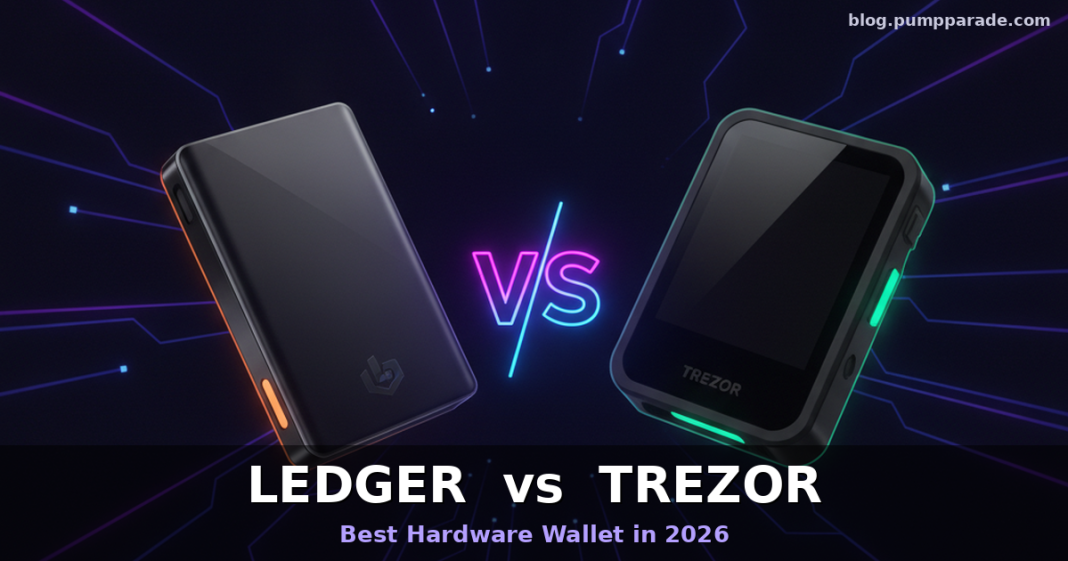
If you hold more than a few thousand dollars in crypto and it still lives on an exchange or a browser extension, you already know the fix: a hardware wallet. The harder question is which one. In 2026 the debate keeps landing on the same two names: Ledger and Trezor. Both are more than a decade old, both have millions of users, and both have upgraded their flagships in the last 18 months. So which one is actually the better buy right now?
This head-to-head compares the Ledger lineup (Nano S Plus, Nano X, Flex, Stax) against the Trezor Safe 5, digs into security architecture, coin support, fees, UX, and mobile experience, and closes with a use-case verdict so you can pick the right device without regret.
Quick Verdict (TL;DR)
- Best for most crypto users in 2026: Ledger Nano X. The mix of 5,500+ supported coins, Bluetooth mobile signing, and the polished Ledger Live app is hard to beat.
- Best for open-source purists and Bitcoin-heavy stackers: Trezor Safe 5. Fully auditable firmware, EAL6+ secure element, and free Shamir Backup at $129.
- Best premium showpiece: Ledger Stax at $399 (curved E Ink touchscreen, wireless charging).
- Best budget entry: Ledger Nano S Plus at $79 if you can live without Bluetooth.
If you still cannot decide, the short version is this: choose Ledger if you want the broadest ecosystem and the smoothest mobile experience; choose Trezor if verifiable open source matters more to you than convenience.
Ledger vs Trezor at a Glance
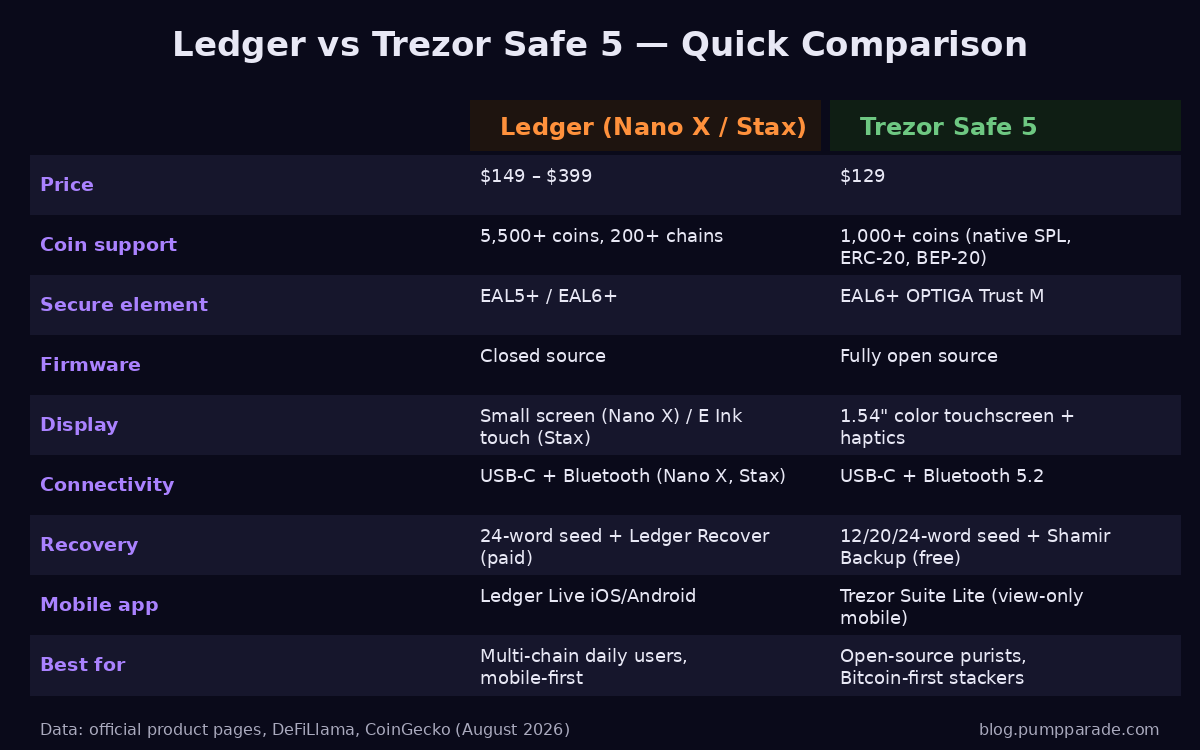
The specs above tell most of the story, but each row hides real tradeoffs. Below, we unpack them.
Company Backgrounds
Ledger launched in 2014 out of Paris and has sold well over 7 million devices worldwide. It suffered a widely covered e-commerce database breach in 2020 that exposed 270,000+ customer records. No hardware wallets or funds were compromised, but the leaked names and addresses fueled years of phishing and, in a few extreme cases, physical threats. Ledger tightened its data handling, but the incident still colors the brand.
Trezor, made by Czech-based SatoshiLabs, invented the modern hardware wallet in 2013. Its unique selling point has always been radical transparency: firmware, schematics, and even bootloader code live on GitHub for anyone to audit. Trezor was slower than Ledger to add a certified secure element, but the Safe 3 and Safe 5 finally closed that gap while keeping the open-source philosophy intact.
Security Deep Dive
Secure Element
Both companies now ship EAL6+ certified secure element chips on their newer models, which puts them in the same league as government ID cards and payment terminals. The Trezor Safe 5 uses the OPTIGA Trust M (EAL6+); the Ledger Nano X and Stax use ST33 chips (EAL5+ and EAL6+ depending on the SKU). In practical terms, remote extraction of your seed from either device via a software flaw is not something anyone has demonstrated.
Open Source vs Closed Source
This is the philosophical fault line. Trezor publishes essentially everything: firmware, apps, hardware schematics. Any independent researcher can compile the firmware, diff it against what is on the device, and verify no backdoor exists. Ledger publishes its higher-level apps but keeps the low-level firmware that runs inside the secure element closed. Ledger's argument is that the chip vendor NDA requires closed code and that certifications are stronger evidence than public source. Trezor's argument is that trust should not require faith. Both positions are defensible; pick the one that matches your threat model.
Physical Attack History
Older Trezor Model One and Model T units had documented physical attack paths where an attacker with physical access, specialized gear, and time could extract the seed. The Safe 3 and Safe 5 added a secure element specifically to close that vector. Ledger has never publicly lost a seed to a physical attack, though the 2018 Ledger Donjon researchers found (and Ledger patched) firmware bugs. Both vendors now have solid physical security.
Ledger Recover Controversy
In 2023 Ledger introduced Ledger Recover, an optional paid subscription that splits your seed into three encrypted shards held by third-party custodians so you can restore your wallet with an ID check. Critics argued that even the technical possibility of the device exporting seed material off-chip breaks the hardware wallet trust model. Ledger points out the feature is opt-in and off by default. Trezor takes a purer stance: it offers free Shamir Backup, which splits the seed into shares you distribute yourself, with no third party involved. If custody of your seed backup is a hard line for you, Trezor wins this one cleanly.
Coin & Chain Support
Ledger's ecosystem is broader. Through Ledger Live and third-party integrations, Ledger officially supports 5,500 to 6,500+ assets across more than 200 chains, including Bitcoin, Ethereum and its major L2s, Solana, XRP, Cardano, Polkadot, Avalanche, BNB Chain, Cosmos, Tron, Sui, Aptos, and TON. Native app integrations for Solana SPL tokens, Ethereum ERC-20, and Bitcoin are excellent.
Trezor Safe 5 covers 1,000+ coins natively and reaches roughly 8,000+ tokens when you count ERC-20, BEP-20, and SPL standards. The biggest gaps versus Ledger are Sui, Hedera (HBAR), TON, and a handful of newer L1s. If you live inside Bitcoin and Ethereum, you will not notice the difference. If you rotate between many Solana ecosystem tokens, memecoins, and cross-chain assets, Ledger's longer tail matters.
Pricing & Fees
Trezor keeps its lineup simple and cheap. The Safe 3 is $79, the Safe 5 is $129, the Safe 7 sits at the top end. There are no subscriptions and no bundled fees.
Ledger runs a wider ladder: Nano S Plus $79, Nano X $149, Flex $249, Stax $399. The Ledger Recover subscription is optional at roughly $9.99 per month if you turn it on. In-app swaps and buys through Ledger Live and Trezor Suite route through third-party providers (MoonPay, Changelly, 1inch, Thorchain, and others), and their spreads typically run 1 to 2% on top of network gas. That is meaningfully more expensive than swapping directly on a DEX aggregator like Jupiter or 1inch. For active swappers, connect your hardware wallet to a browser DEX instead of using the built-in provider.
Total Cost of Ownership (2 years)
- Trezor Safe 5: $129 device + $0 subscription = $129
- Ledger Nano X: $149 device + $0 subscription (Recover off) = $149
- Ledger Nano X + Recover: $149 + ~$240 (24 months) = ~$389
- Ledger Stax: $399 device + $0 (Recover off) = $399
User Experience
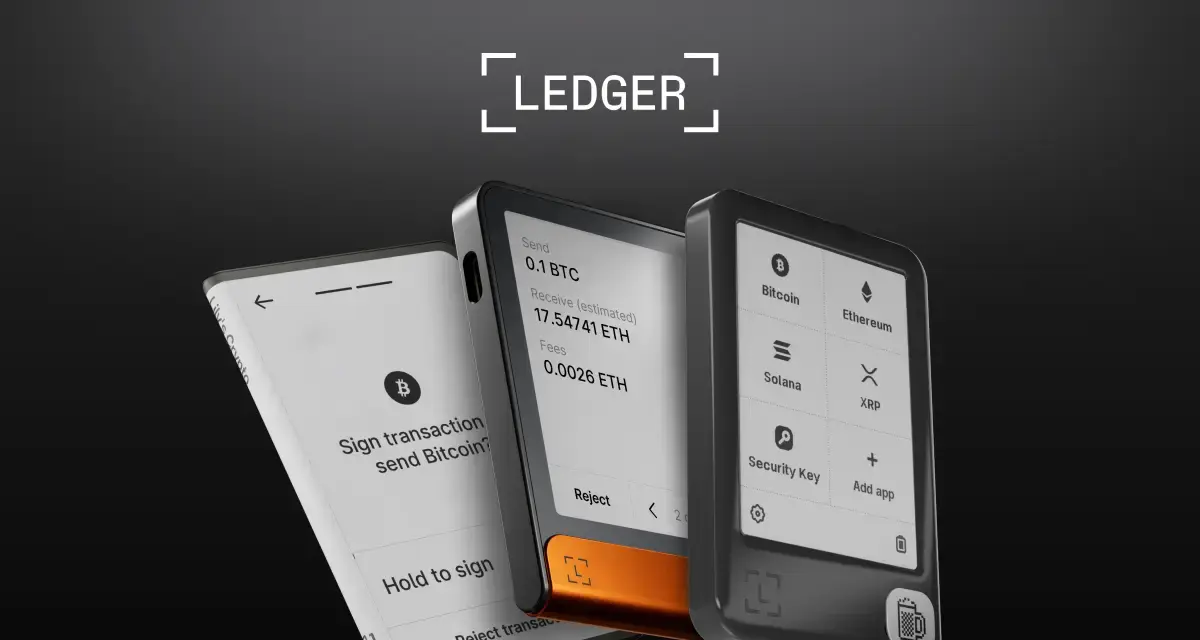
Ledger Live is the more mature companion app. Portfolio dashboards, staking for ETH, SOL, DOT, ATOM, ADA, and TRX, NFT viewing, market data, and a WalletConnect bridge all live in one place, and it works on desktop and mobile with Bluetooth pairing to the Nano X and Stax. First-time setup takes about ten minutes and the app walks you through PIN, seed generation, and firmware verification.
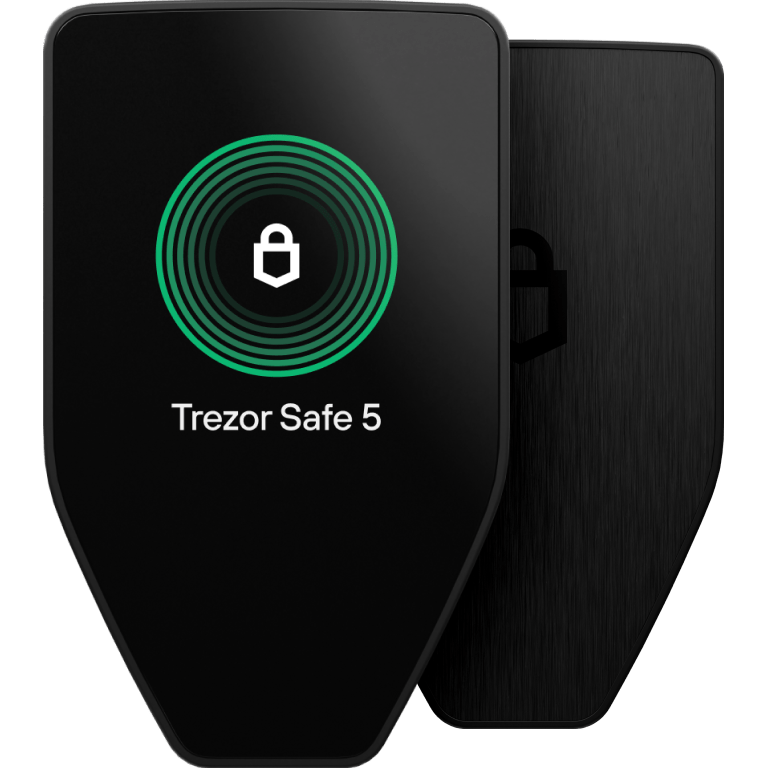
Trezor Suite is cleaner, more privacy-focused, and includes a built-in Tor toggle that Ledger Live still lacks. The Safe 5's 1.54" color touchscreen with haptic feedback is genuinely delightful to use, and transaction verification on-device is easier to read than Ledger's tiny Nano screens. Where Trezor falls behind is mobile: Trezor Suite Lite on iOS and Android is view-only. To sign a transaction you still need a computer. Ledger's Bluetooth signing on iPhone and Android remains a real edge for anyone who trades or interacts with dApps on the go.
Pros and Cons
Ledger (Nano X / Stax)
Pros
- Widest asset support in the industry (5,500+ coins, 200+ chains)
- Bluetooth signing on iOS and Android for real mobile use
- Polished Ledger Live app with staking, swaps, NFT support in one place
- Certified secure element with an unbroken track record
- Strong physical build quality (Stax's curved E Ink is a genuine engineering feat)
Cons
- Closed-source firmware inside the secure element
- Ledger Recover shook trust for many long-time users, even if opt-in
- 2020 e-commerce breach still generates phishing attempts against Ledger customers
- Stax and Flex are pricey relative to what Trezor offers
Trezor Safe 5
Pros
- Fully open-source firmware, verifiable by anyone
- EAL6+ secure element (OPTIGA Trust M) with no closed-source layer above it
- Best-in-class color touchscreen and on-device transaction preview
- Free Shamir Backup for advanced seed management
- Excellent value at $129
- Trezor Suite includes native Tor support for private connections
Cons
- Mobile experience is view-only; signing still requires a computer
- Fewer supported coins than Ledger, especially on newer L1s
- No dedicated NFT gallery in Suite
- Historical physical-attack reputation lingers, even though Safe 5 has closed those vectors
Security & Trust in Numbers
Both companies now publish external audit reports. Ledger's in-house team, Ledger Donjon, is one of the most respected hardware security research groups in the industry and publishes findings on other vendors, including Trezor. Trezor works with third-party auditors and, crucially, invites open community audits.
Independent aggregators like the CoinGecko hardware wallet directory and the DeFiLlama protocol dashboards both list Ledger and Trezor among the top three self-custody solutions by holdings secured, alongside older Bitcoin-only specialists like Coldcard. Neither device has been drained through a remote software exploit in the last 24 months.
Which Should You Buy?
Buy Ledger if…
- You hold a diverse portfolio across many chains, especially newer L1s and L2s.
- You want to sign transactions from your phone (Bluetooth on Nano X and Stax).
- You value polished software (Ledger Live) over ideological open source.
- You want an all-in-one app for staking, swaps, and NFT viewing.
Buy Trezor Safe 5 if…
- You want firmware you or a researcher can inspect line by line.
- Your holdings are Bitcoin, Ethereum, and their L2s, plus major SPL and ERC-20 tokens.
- You prefer to sign from a computer (or already do most of your DeFi from desktop).
- You care about advanced backup options like Shamir shares.
- You want the best value: $129 for a modern touchscreen wallet is a strong deal.
Consider Both
Serious long-term holders often keep two hardware wallets from different vendors: one primary for daily use, one cold-storage backup with a different seed and passphrase. It is a straightforward hedge against a single vendor flaw, and at combined $278 for a Trezor Safe 5 plus a Ledger Nano X, it is cheaper than most people's monthly gas bill.
Setup Tips (For Either Device)
- Buy only from the official store: ledger.com or trezor.io. Never buy hardware wallets from Amazon or eBay resellers.
- Verify the device is genuine using the official app's attestation check on first connect.
- Generate the seed on the device itself. Never accept a pre-printed seed card.
- Write the 12, 20, or 24 words on paper or a steel plate. Store two copies in two locations.
- Add a passphrase (the 25th word) if your holdings justify the extra ceremony. Losing the passphrase means losing the funds; do not skip the backup.
- Move a small test amount first. Confirm you can receive and send before you migrate serious size.
Frequently Asked Questions
Is Ledger safe to use after the 2020 data breach?
The breach exposed customer email and shipping information from Ledger's e-commerce site, not seeds or funds. Your Ledger device itself was never compromised. That said, Ledger customers still receive frequent phishing emails and fake "Ledger" texts. Never enter your 24-word seed into any website or app. Ledger will never ask for it.
Is Trezor open source really more secure than Ledger closed source?
Open source does not automatically mean more secure, but it does mean more auditable. Nobody has to trust a marketing claim; the code is on GitHub. In practice, both devices are secure enough that the weak link is almost always the user, not the wallet.
Can I use the same seed on both a Ledger and a Trezor?
Yes, if you use the standard BIP-39 12 or 24-word seed (Ledger's default and Trezor's default without Shamir). You can restore the same seed onto a device from either vendor and see the same addresses. This is a useful test if you ever need to migrate or verify a backup.
Do I still need a hardware wallet if I use a strong hot wallet like Phantom or Backpack?
For everyday spending and small trading balances, a well-configured hot wallet is fine. For long-term holdings, a hardware wallet remains the single biggest upgrade you can make to your security. See our Phantom Wallet Review 2026 and Backpack Wallet Review 2026 for how the leading hot wallets stack up, but the rule of thumb is the same: cold storage for savings, hot wallets for spending.
Does Ledger Recover mean my seed is stored online?
Only if you opt in and pay the subscription. When enabled, an encrypted representation of your seed is split into three shards and held by three separate custodians (Ledger, Coincover, and EscrowTech). Turned off, your seed never leaves the device. Most experienced users leave it off.
Bottom Line
In 2026, neither Ledger nor Trezor is a bad choice; both protect your keys better than any exchange or browser extension ever will. The choice comes down to values and use case.
If you need the broadest coin support, real mobile signing, and a polished all-in-one app, buy the Ledger Nano X ($149). If you want fully open-source firmware, a beautiful touchscreen, free Shamir Backup, and the best price-to-value ratio in the market, buy the Trezor Safe 5 ($129). And if you are securing life-changing amounts, use both, from different vendors, with different seeds. That is what the professionals do.