If you’ve spent any time researching tokens, chasing alpha, or trying to figure out what the whales are doing, you’ve almost certainly bumped into Nansen. It is the analytics platform that effectively created the “Smart Money” category, and after a sweeping 2026 relaunch (new product, new pricing, new chains, even onchain trading), it has changed enough that any older review on the internet is now out of date.
This is a fresh, hands-on look at where Nansen stands in May 2026. We will cover what it is, how the new free and Pro tiers compare, the headline features, the fees you actually pay, the chains it now supports, where it shines, where it struggles, and whether it is worth $49 a month if you are a serious onchain trader.
Quick Verdict: Nansen Rating 4.5 / 5
Nansen remains the most polished, professional onchain analytics product on the market. Its wallet labels are unmatched in depth, its Smart Money dashboards still surface trades that other tools miss, and the simplified Pro plan at $49 per month is the single biggest UX improvement in years. The free tier is enough for casual research, and the Pro tier is genuinely affordable for any active trader. The main reason it is not a perfect 5 is that competitors like Arkham now match it on basic wallet tracking for $0, and Nansen’s interface still has a learning curve.
Best for: active onchain traders, fund analysts, NFT researchers, anyone who tracks Smart Money flows.
Skip if: you only buy on a centralized exchange and never look at wallets.
What Is Nansen?
Nansen is a blockchain analytics platform that ingests onchain data from more than a dozen networks, attaches human-readable labels to the wallets behind that activity, and then surfaces those labels through dashboards, alerts, and a query layer. The headline use case is “Smart Money” tracking, which means watching the wallets of profitable traders, funds, market makers, and protocol insiders in near-real time so you can react when they react.
The company was co-founded in 2019 by Alex Svanevik, Evgeny Medvedev, and Lars Bakke Krogvig, and it is backed by Andreessen Horowitz, Tiger Global, and other top tier investors. According to Nansen’s own documentation, the labels database now covers over 300 million wallet addresses across 12 plus chains, which is the moat that keeps it ahead of cheaper alternatives.
Nansen 2 and the 2026 Relaunch
For most of its life, Nansen was an expensive professional tool. The old Pioneer plan cost $129 a month, and the Professional tier ran from $999 to several thousand. That changed with the Nansen 2 redesign and a pricing overhaul that collapsed the old four tier structure into just two plans: Free and Pro. The new Pro plan is $49 per month on an annual subscription, or $69 per month if you pay monthly, which works out to roughly a 62 percent cut from the old Pioneer price and around 95 percent off the old Professional tier.
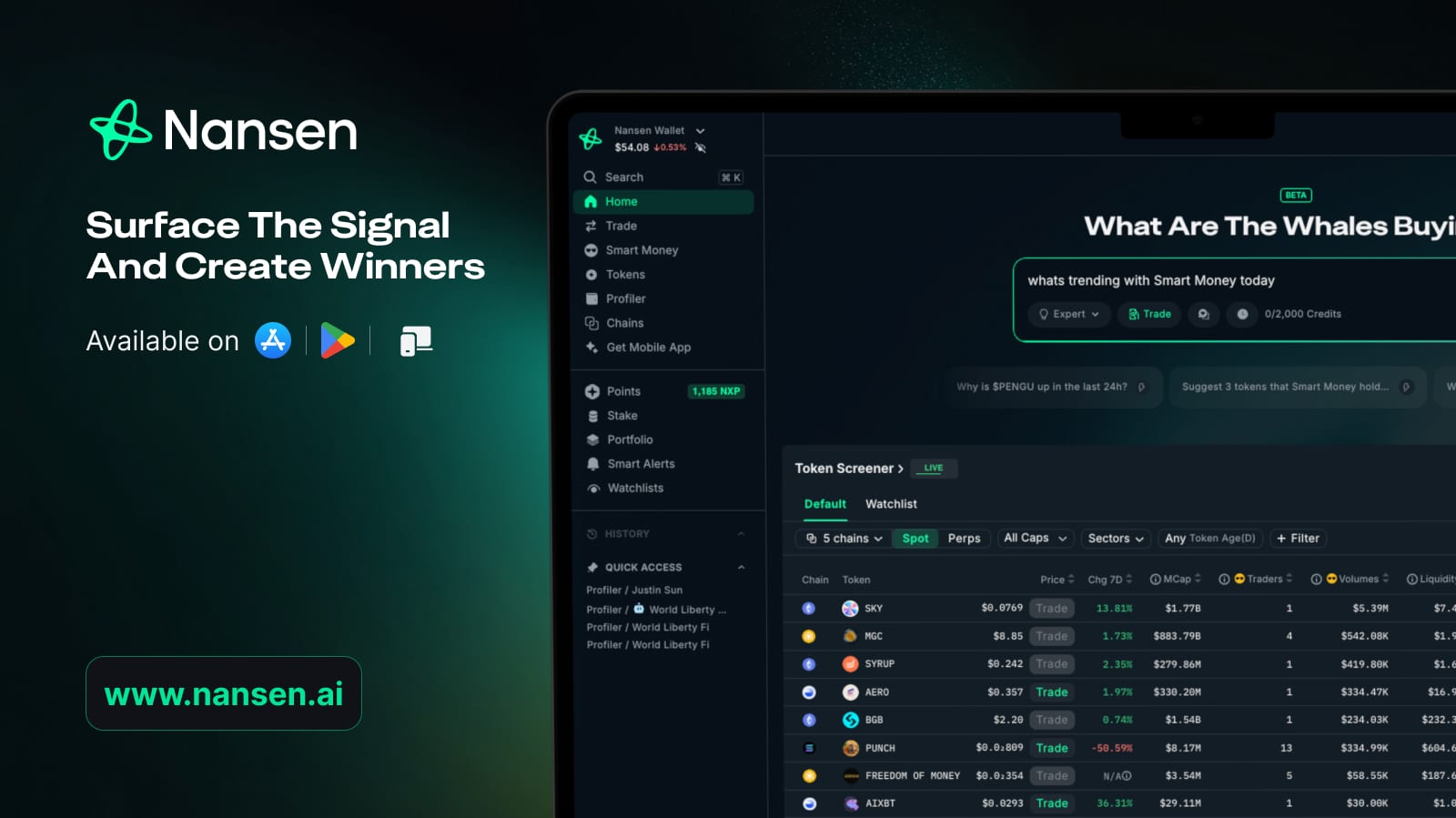
At the same time, Nansen shipped a redesigned dashboard, a real-time Signal feed, a “Smart Segment” builder for custom wallet groups, native onchain trading on Solana and Base, and a cross-chain swap rail powered by partners like Jupiter, OKX, and LI.FI. The product still has rough edges, but the trajectory is clearly toward a much broader, more retail friendly tool.
Key Features

1. Smart Money Dashboards
This is still the marquee feature. Nansen maintains a curated set of roughly a dozen “Smart Money” labels assigned to wallets that meet specific behavioral criteria, including historical PnL, holding patterns, and onchain history. Examples include Smart Money Funds, Smart LPs, Smart Airdrop Farmers, Smart NFT Traders, and Top Ranked Wallets. The dashboards then aggregate flows from those wallets so you can see what they are buying, selling, and holding without manually opening 200 Etherscan tabs.
2. Wallet Labels (300M+ Addresses)
The label database is the single biggest reason traders pay for Nansen. Every label in the system has to be backed by compiled evidence, which the team has talked about publicly as a deliberate quality-assurance moat. You get coverage of exchanges, funds, market makers, KOLs, MEV bots, bridges, and protocol contracts across Ethereum, Solana, Base, BNB Chain, and more. That context is what turns a random transaction into a story.
3. Signal: Real-Time Alerts
Signal is Nansen 2’s real-time feed of unusual onchain activity. It flags things like a Smart Money cluster suddenly accumulating a new token, large stablecoin movements off CEXs, abnormal liquidity adds, and other patterns. Pro subscribers can layer custom alert criteria on top of it.
4. Smart Segments
Smart Segments lets you define your own custom wallet group based on labels, token holdings, or activity, then track that segment as if it were one of Nansen’s native dashboards. This is the feature that converts Nansen from a “look at what Nansen thinks is interesting” tool into “look at what I think is interesting”, which is the upgrade serious researchers have wanted for years.
5. Native Onchain Trading
As of January 21, 2026, Nansen opened its native onchain trading to all users on Solana and Base. Trades route through Jupiter, OKX, and LI.FI for execution, and you can swap directly from Base to Solana inside the app. Fees are 0.10 percent for Pro users and 0.25 percent for Free users, which is competitive with most Solana trading interfaces and noticeably cheaper than most Telegram bots once you factor in their priority fee markups.
6. Token, Wallet, and Chain Pages
Every token, wallet, and chain on a supported network has a dedicated profile page with holders, flows, top buyers and sellers, Smart Money exposure, and historical PnL. These pages are the daily-driver views for most active traders, and they are noticeably faster after the Nansen 2 rebuild.
7. NFT Analytics
Nansen kept its NFT analytics through the rebrand and they remain stronger than most competitors, including Arkham. You get collection-level Smart Money exposure, top buyer flows, wash trade detection, and floor price analytics across the major marketplaces.
Supported Chains
As of May 2026, Nansen supports analytics on Ethereum, Solana, Base, BNB Chain, Polygon, Arbitrum, Optimism, Avalanche, Linea, Blast, Scroll, and Hyperliquid, with deeper Smart Alerts and Smart Segment coverage on the headline networks. The team is on record about prioritizing Solana and Base for new product features like trading, with the rest of the network list expanding over time.
Pricing: Free vs Pro
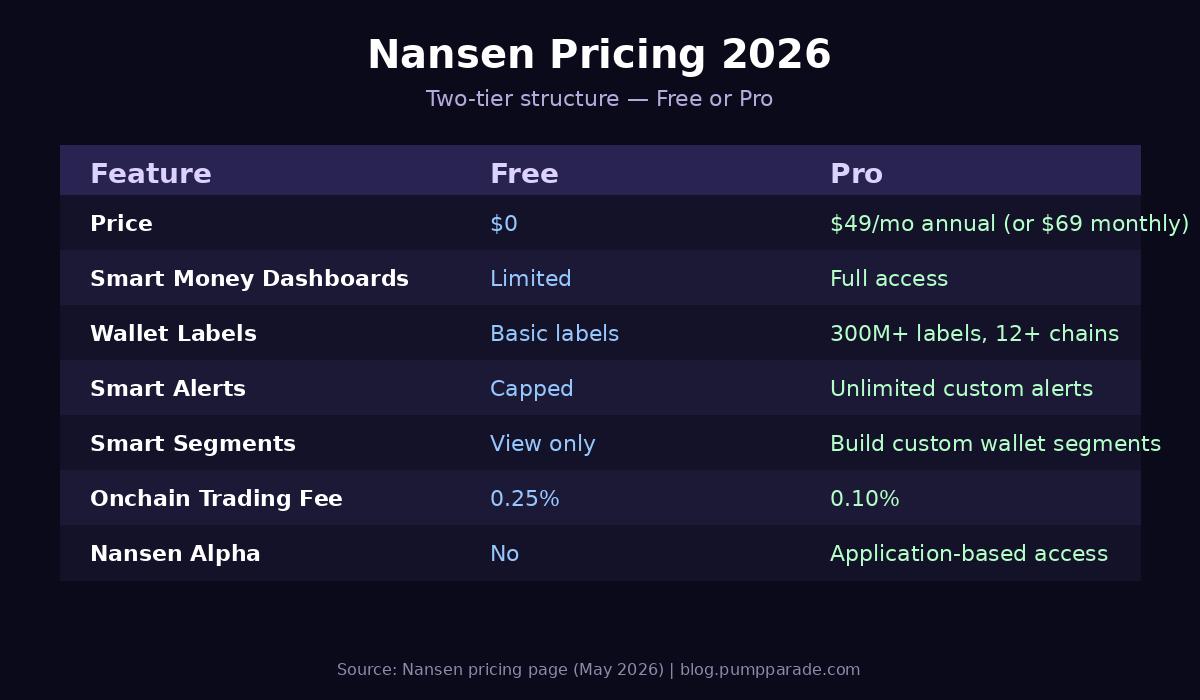
The new two-tier structure is refreshingly simple. Here is what you get at each level.
Free Plan ($0)
The Free plan gives you a real, usable slice of Nansen. You can browse token pages, view limited Smart Money dashboards, get a capped number of alerts, and trade onchain at 0.25 percent. It is enough to evaluate the product and to do light, casual research, but the rate limits and reduced label depth will frustrate you fast if you are trading every day.
Pro Plan ($49/month annual, $69/month monthly)
Pro is where Nansen earns its reputation. You get full Smart Money dashboards, unlimited Smart Alerts, the Smart Segments builder, deeper label access, faster data refreshes, and the reduced 0.10 percent onchain trading fee. For comparison, the old Pioneer plan that delivered a similar feature set cost $129 a month, so existing power users are effectively paying 62 percent less for more product.
Nansen Alpha
Nansen Alpha is a separate, application-based community for institutional users, funds, and high-volume traders. It is invite gated and not a self-serve tier, so most readers can ignore it unless your trading desk is going to apply directly.
How Nansen Compares to Arkham, Birdeye, and DexScreener
Nansen is not the only onchain tool worth using, and the right answer for many traders is a stack of two or three products. Here is how it fits next to the most common alternatives.
Nansen vs Arkham Intelligence. Arkham is the closest direct competitor and has a generous free tier. Arkham is stronger on entity attribution and graph-style fund tracing, and its token economics let it stay free for retail. Nansen still has the deeper label database, the stronger NFT analytics, and (in our testing) a noticeably cleaner Smart Money product. Serious researchers often pay for Nansen and keep an Arkham tab open for graph queries.
Nansen vs Birdeye and DexScreener. Birdeye and DexScreener are price and chart focused, optimized for “find a token, watch its candles, click trade.” Nansen is wallet focused, optimized for “find a wallet, follow what it does next.” They are complementary tools. If you only need price discovery and live charts, save your $49. If you want to understand who is on the other side of those candles, Nansen is the upgrade.
Nansen vs DeFi-native dashboards (Dune, DeFiLlama). Dune is a SQL playground and DeFiLlama is a free TVL and fee aggregator, and both are excellent for what they do. They do not, however, give you a labeled wallet feed in real time. Nansen sits one layer above them: it bakes the queries into product.
Security and Trust
Nansen does not custody user funds, which is the single biggest piece of good news from a security perspective. The platform is a read-mostly analytics product, and the new onchain trading routes through audited DEX aggregators (Jupiter, OKX, LI.FI) rather than running custom liquidity. When you trade through Nansen, you sign transactions in your own wallet, the same as you would on Jupiter directly.
The company itself has a strong reputational moat. It is venture backed by Andreessen Horowitz and Tiger Global, the founding team is public and active, and CEO Alex Svanevik has written publicly about a “trust ladder” approach to agentic trading that emphasizes incremental human approval. None of that is a substitute for using a hardware wallet (see our Ledger vs Trezor guide if you have not yet), but the platform itself is one of the more trustworthy operators in crypto data.
User Experience
Nansen 2 is the most polished iteration of the product to date. The information density is still high, and a first-time user will feel mildly overwhelmed staring at a Smart Money dashboard with twelve nested filters. But the navigation has been simplified, page loads are faster, and the new tabbed layout for token and wallet profiles is a meaningful step up from the older interface.
Mobile support is reasonable on the web app, and the Signal feed in particular is well suited to checking on your phone between meetings. Search has improved, and the global command palette finally feels usable. For absolute beginners, the learning curve is the main complaint that comes up in user reviews, and it remains a fair one. Plan to spend an hour with the Nansen Academy materials before you make any judgments.
Pros and Cons
Pros
- Largest, deepest wallet label database in the industry (300M+ addresses, 12+ chains).
- Smart Money dashboards remain the gold standard for following profitable wallets.
- New $49 Pro plan is a massive price cut from the old $129 Pioneer tier.
- Smart Segments finally lets you build your own custom wallet feeds.
- Native onchain trading at 0.10 percent for Pro is competitive with dedicated trading interfaces.
- Strong NFT analytics, an area where most competitors are thin.
- Backed by tier 1 investors and a public, technically credible team.
Cons
- Free tier is genuinely useful for sampling but quickly hits caps for daily use.
- Interface still has a learning curve, especially for users new to onchain data.
- Arkham covers some basic wallet tracking workflows for free.
- Some advanced features (Nansen Alpha) are gated behind an application process.
- If you only trade on a centralized exchange, you will not get your $49 of value.
Who Should Subscribe to Nansen Pro?
The honest answer is that the new Pro pricing makes the decision easy. If you trade onchain more than a few times a month, follow Smart Money wallets, run any kind of token research workflow, or are an NFT trader trying to read flows around a launch, $49 per month is a no-brainer at the current label coverage. The Pro fee is recouped in a single avoided bad entry.
If you are a casual investor who buys ETH and SOL on Coinbase once a quarter, the Free tier is genuinely all you need and you should not feel any pressure to upgrade.
Frequently Asked Questions
Is Nansen free to use?
Yes. Nansen offers a Free plan that includes limited Smart Money dashboards, capped alerts, and onchain trading at a 0.25 percent fee. The Pro plan unlocks the full product for $49 per month on an annual subscription or $69 per month on monthly billing.
What chains does Nansen support in 2026?
Nansen supports analytics on Ethereum, Solana, Base, BNB Chain, Polygon, Arbitrum, Optimism, Avalanche, Linea, Blast, Scroll, and Hyperliquid, with the deepest feature coverage on Ethereum, Solana, and Base. Onchain trading is live on Solana and Base.
Is Nansen safe to use?
Nansen does not custody user funds. It is a read-focused analytics product, and onchain trading routes through audited DEX aggregators where you sign transactions in your own wallet. The company is venture backed by Andreessen Horowitz, Tiger Global, and others.
How accurate are Nansen’s Smart Money labels?
Every label in Nansen’s database is backed by compiled evidence under the team’s internal quality assurance process. Labels are derived from rule based criteria like historical PnL, holding patterns, and onchain behavior, not arbitrary curation. Errors do happen, but the false-positive rate is meaningfully lower than competing wallet trackers.
Is Nansen better than Arkham Intelligence?
For Smart Money tracking, NFT analytics, and labeled wallet feeds, Nansen Pro is the stronger product. For entity attribution and graph-style fund tracing on a free tier, Arkham is excellent. Many serious researchers use both.
Final Verdict
Nansen in 2026 is a fundamentally different proposition than it was even twelve months ago. The new $49 Pro tier removes the single biggest objection to the platform, the Nansen 2 redesign genuinely improved the daily experience, and features like Smart Segments and native onchain trading turn the product into a research and execution stack rather than a passive dashboard.
If you are serious about onchain trading, this is the analytics tool to beat in 2026. Use the Free plan for a week, decide whether the Smart Money dashboards change how you allocate, and upgrade to Pro if they do. Try Nansen here and decide for yourself.
Disclosure: This is an independent product review. PumpParade does not have a paid relationship with Nansen at the time of publication. Always do your own research before paying for any subscription, and never trade with money you cannot afford to lose.