Looking for the fastest way to trade tokens on Solana? Photon has become one of the most popular trading terminals in the Solana ecosystem, processing billions of dollars in volume and generating over $421 million in platform fees. But is it actually worth the cost?
In this review, we break down everything you need to know about Photon in 2026: its features, fees, security, user experience, and whether it deserves a spot in your trading toolkit.
Quick Verdict: 4.0 / 5.0
Photon is the best web-based trading terminal for active Solana traders who rely on charts and want fast execution. Its real-time candlestick charts, one-click trading, and built-in security filters make it feel like a CEX-grade experience for on-chain trading. The main drawback is the 1% fee on every transaction, which adds up quickly for high-volume traders. If speed and visual feedback matter more to you than saving on fees, Photon is hard to beat.
What Is Photon?
Photon is a web-based Solana trading terminal that lets you discover, analyze, and trade tokens directly from your browser. Unlike Telegram-based bots like Trojan or BonkBot, Photon provides a full visual interface with live charts, real-time trade feeds, and portfolio tracking. Think of it as a Bloomberg terminal for Solana memecoin and token trading.
The platform connects to your Solana wallet (Phantom, Backpack, or Solflare) and routes trades through Solana DEXs like Raydium and Jupiter. It has quickly become one of the highest-revenue applications in the entire Solana ecosystem, which says a lot about how many traders rely on it daily.
Key Features
Real-Time Charts and Market Data
Photon’s standout feature is its charting interface. You get live candlestick charts with volume indicators, price alerts, and multiple timeframe options. The data refreshes significantly faster than standalone chart tools like DexScreener, giving active traders a real edge when timing entries and exits. The chart view also includes a color-coded transaction history that shows buys and sells in real time, so you can see exactly what other traders are doing on a pair.
One-Click Buy and Sell
Speed is everything in Solana trading, especially for new token launches. Photon offers one-click buy and sell buttons with preset SOL amounts (0.25, 0.5, 1, 2, 5, 10 SOL). You can paste a token contract address and execute a buy in seconds. The platform uses private node infrastructure for faster transaction landing, and you can customize slippage tolerance, priority fees, and Jito bribes for each trade.
Token Discovery and Security Filters
The “New Pairs” tab continuously streams newly launched tokens on Solana. What makes Photon different from a raw token scanner is the built-in security filter layer. Before you invest, Photon checks each token for red flags: mint authority status, freeze authority, LP burn percentage, and top-holder concentration. These checks help you avoid rug pulls and honeypot tokens before you commit any capital.
Advanced Order Types
Beyond simple market orders, Photon supports limit orders and DCA (Dollar-Cost Averaging) orders. Limit orders let you set a target price and walk away, while DCA orders automatically split your buy into multiple smaller purchases over time. These features bring a level of sophistication that you typically only find on centralized exchanges.
MEV Protection
Sandwich attacks are a real problem on Solana DEXs. Photon addresses this with Smart-MEV toggles that offer “Fast” and “Secure” modes. The Secure mode uses Jito bundles to ensure your transactions are not sandwiched by predatory bots. The Fast mode optimizes for speed with threshold-based Jito bribes to increase transaction inclusion during congestion periods.
Multi-Wallet Support and Portfolio Tracking
You can connect multiple wallets and switch between them within the Photon interface. The Holdings tab provides live portfolio tracking with real-time updates on token values, security risk assessments, and overall performance metrics. This makes it easy to monitor all your positions without switching between multiple tools.
Fees and Pricing
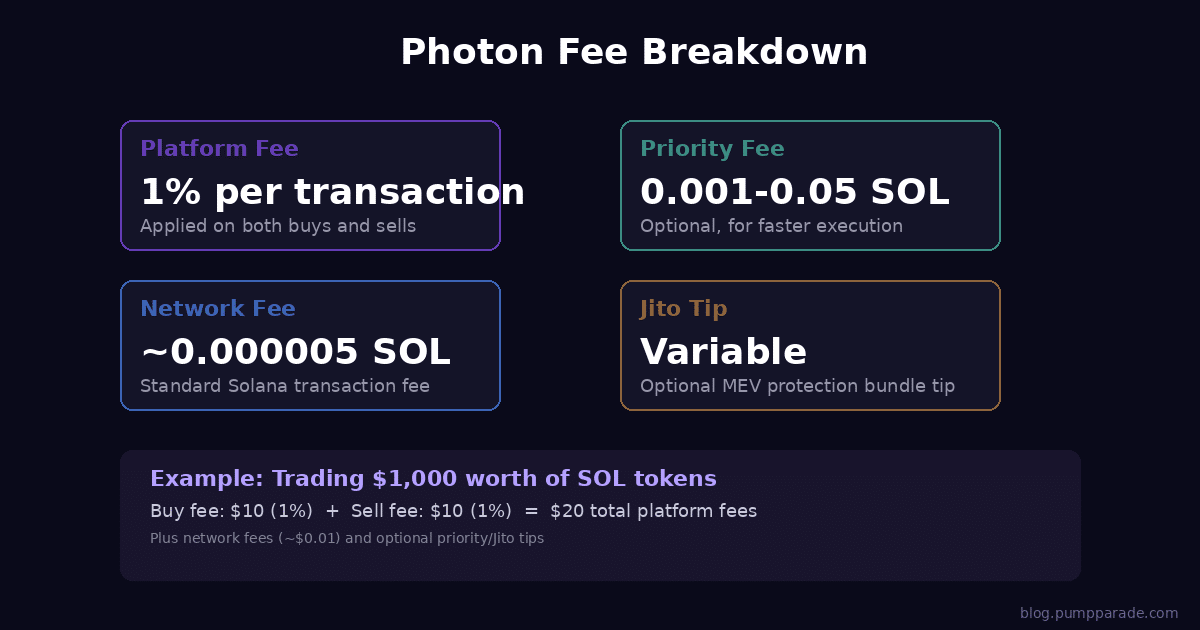
Photon charges a flat 1% platform fee on every transaction. This applies to both buys and sells, calculated on the SOL amount for buys and the gross sell proceeds for sells. So if you buy $1,000 worth of tokens, you pay $10 in platform fees on the buy, and another 1% when you sell.
On top of the platform fee, standard Solana network fees apply (typically fractions of a cent). If you enable priority fees or Jito tips for faster execution, those costs are additional. Here is a quick breakdown of what you can expect to pay:
- Platform fee: 1% on every buy and sell
- Solana network fee: ~0.000005 SOL per transaction
- Priority fee (optional): 0.001 to 0.05 SOL depending on congestion
- Jito tip (optional): Variable, used for MEV protection bundles
Is 1% expensive? Compared to alternatives like BullX (1% fee) and Trojan (0.9% fee), Photon is in the same ballpark. However, Jupiter’s native trading interface charges no platform fee at all, and some newer competitors offer 0.5% or lower. For high-frequency traders making dozens of trades per day, that 1% compounds significantly.
Pros and Cons
Pros
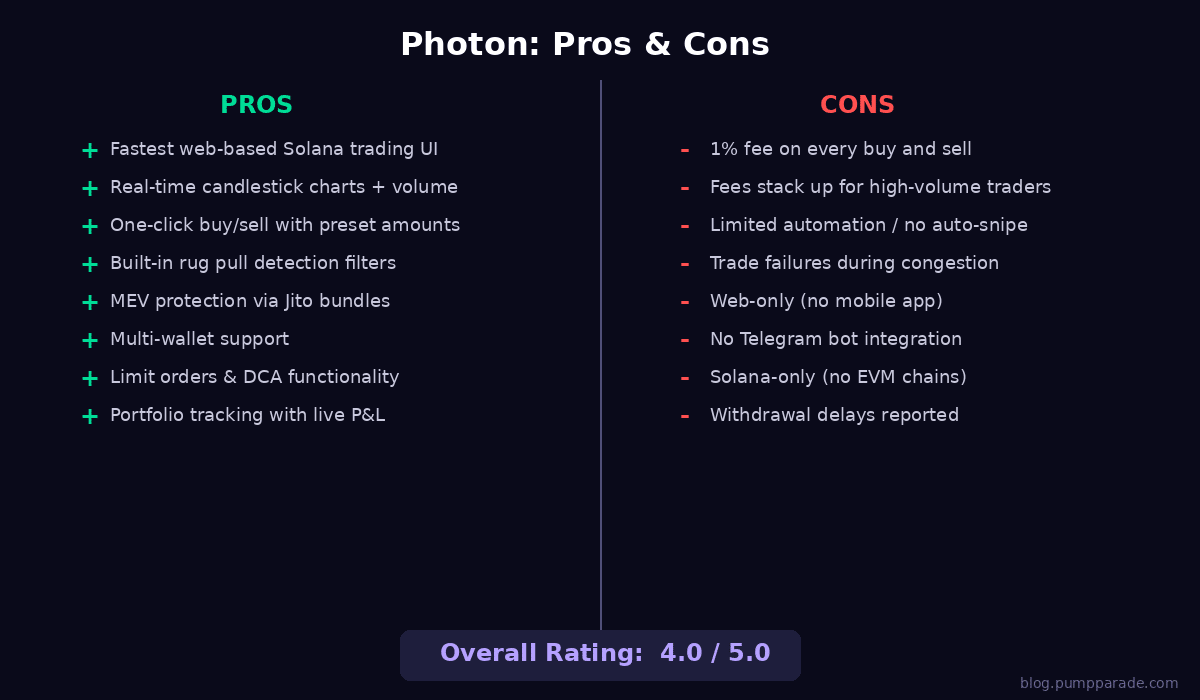
- Fastest web-based Solana trading UI with data refreshing faster than competing tools
- Excellent visual interface with real-time candlestick charts, volume indicators, and color-coded trade histories
- Built-in rug pull detection that checks mint authority, freeze authority, LP burns, and holder concentration
- MEV protection via Jito bundles to prevent sandwich attacks
- Limit orders and DCA for more sophisticated trading strategies
- Multi-wallet support with easy switching between accounts
- Portfolio tracking with live P&L and security risk monitoring
Cons
- 1% fee on every transaction adds up quickly for active traders
- Transaction failures during congestion can cause missed opportunities, especially during memecoin launches
- Limited automation compared to Telegram bots like Trojan or BonkBot
- Web-only platform with no dedicated mobile app
- Solana-only with no support for Ethereum or other EVM chains
- Some reports of withdrawal delays from community members
Security and Trust
Photon is a non-custodial platform, meaning it never holds your funds. All trades are executed through your connected Solana wallet, and you maintain full control of your private keys at all times. The platform does not require KYC or account creation beyond connecting a wallet.
On the security side, Photon’s built-in token scanning is one of its strongest features. The automated checks for mint authority, freeze authority, LP burn status, and holder concentration provide an extra layer of protection against rug pulls. However, no automated scanner is foolproof, and you should always do your own research before trading any token.
The platform has generated over $421 million in cumulative fees, indicating a large and active user base. This track record, combined with its non-custodial architecture, gives it a reasonable trust profile. That said, the team behind Photon remains pseudonymous, which is common in the Solana trading bot space but worth noting.
User Experience
Getting started with Photon is straightforward. Visit photon-sol.tinyastro.io, connect your Phantom or Backpack wallet, and you are ready to trade. The interface is well-designed and feels responsive, with the trading dashboard loading quickly even on modest hardware.
The learning curve is minimal if you have any experience with trading interfaces. The layout is intuitive: charts on the left, token info and trading controls on the right, with a navigation bar for New Pairs, Holdings, and Leaderboard. Power users will appreciate the ability to customize slippage, priority fees, and Jito settings for each trade.
One area where Photon falls short is mobile. The platform is web-based and works in a mobile browser, but the experience is not optimized for small screens. If you do most of your trading on mobile, a Telegram-based bot like Trojan might be a better fit.
If you are looking for a reliable Solana wallet to pair with Photon, check out our recent comparison of Phantom and Backpack.
How Photon Compares to Alternatives
| Feature | Photon | BullX | Trojan | GMGN |
|---|---|---|---|---|
| Platform Type | Web terminal | Web terminal | Telegram bot | Web + Telegram |
| Fee | 1% | 1% | 0.9% | 1% |
| Live Charts | Yes | Yes | No | Yes |
| MEV Protection | Yes (Jito) | Yes | Yes | Yes |
| Limit Orders | Yes | Yes | Yes | Yes |
| DCA Orders | Yes | No | Yes | No |
| Multi-Chain | Solana only | Multi-chain | Multi-chain | Multi-chain |
| Mobile App | No | No | Telegram | Telegram |
| Rug Detection | Yes | Yes | Basic | Yes |
Photon stands out for its charting quality and execution speed. BullX offers a similar web-based experience with multi-chain support. Trojan is the go-to for traders who prefer Telegram and want slightly lower fees. GMGN offers both a web interface and Telegram bot, making it a versatile option.
Verdict: Is Photon Worth It in 2026?
Rating: 4.0 / 5.0
Photon is the best choice for active Solana traders who want a professional-grade visual trading experience. If you rely on charts, want fast execution, and appreciate built-in security scanning, Photon delivers all of that in a polished web interface.
The 1% fee is the main consideration. For casual traders making a few swaps per week, it is a reasonable cost of convenience. For high-frequency traders or those working with large positions, the fees add up and you may want to consider routing larger trades through Jupiter directly.
Use Photon if: You want the fastest charts, one-click trading, and built-in security on Solana. You value visual feedback and a desktop trading experience.
Skip Photon if: You trade primarily on mobile, need multi-chain support, or make high-frequency trades where the 1% fee significantly cuts into your profits.
Ready to try it? Visit Photon and connect your Solana wallet to get started.
FAQ
Is Photon safe to use?
Photon is a non-custodial platform, so it never holds your funds. All trades execute through your connected wallet. The platform also includes built-in token security scans to help you avoid rug pulls. However, the team behind Photon is pseudonymous, which is standard for the Solana bot ecosystem.
How much does Photon cost?
Photon charges a 1% platform fee on every buy and sell transaction. Standard Solana network fees also apply, and you can optionally add priority fees or Jito tips for faster execution.
Does Photon work on mobile?
Photon is a web-based platform and can be accessed through a mobile browser, but the interface is optimized for desktop. For mobile trading, Telegram-based bots like Trojan or BonkBot offer a better experience.
What wallets does Photon support?
Photon supports Phantom, Backpack, Solflare, and other Solana-compatible wallets. You can also use multiple wallets simultaneously and switch between them in the interface.
Can I use Photon for Ethereum or other chains?
No. As of 2026, Photon is exclusively a Solana trading terminal. If you need multi-chain support, consider alternatives like BullX or GMGN that support Ethereum and other EVM chains alongside Solana.